
Conan Workspaces: a monolithic super-build of your packages, on demand


There is a long-running argument in C and C++ organizations: should a large codebase be a monorepo with a single monolithic build, or a set of independently versioned components, each in its own repository, consumed as packages?
Each camp has good reasons. The component approach gives you per-component versioning and releases, pre-built binaries and builds that only touch what changed. The monorepo approach gives you “live at head” development: change a header in a low-level library, and the next build recompiles every consumer, in one build tree. The component approach usually loses that developer experience when needing to work simultaneously on multiple different packages. But the component approach can be better for large organizations with different teams working at different paces, using package releases to work more independently.
This post is about not having to choose. Conan workspaces let you keep your components as versioned packages in different git repositories, with precompiled binaries for efficient consumption and, at the same time, bring back multiple components and collapse them into a single monolithic super-build for development UX and convenience.
The problem: changing a library deep in the graph
Let’s use a small example graph. game is an application that depends on engine, which depends on ai and graphics, which both depend on mathlib. All of them are static libraries, each one lives in its own git repository, and each is a Conan package in our server.
The repositories are conanci_mathlib, conanci_ai, conanci_graphics, conanci_engine and conanci_game. The workspace itself is in conanci_workspace.
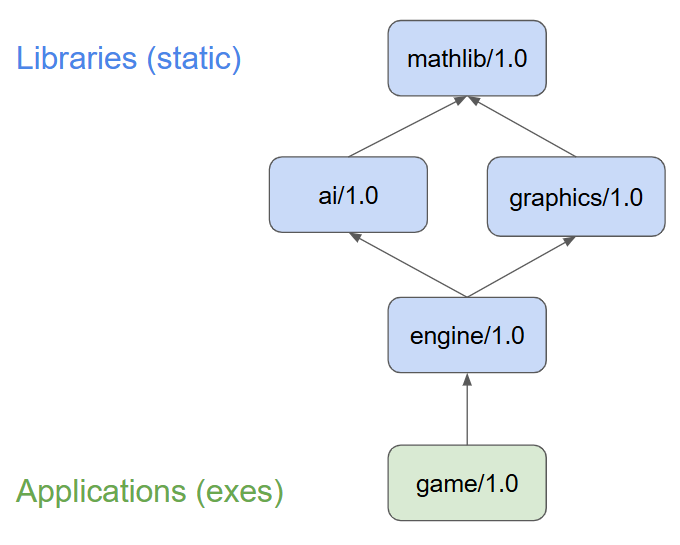
The dependencies are declared with version ranges, for example in engine:
class EngineRecipe(ConanFile):
    name = "engine"
    version = "1.0"
    requires = "ai/[>=1.0 <2]", "graphics/[>=1.0 <2]"
I want to add a feature to ai, an API-compatible change that will become ai/1.1, and verify that game still builds and works correctly with it. engine sits between the two. Its code won’t change, but it’s a static library compiled against ai’s headers, so it has to be rebuilt.
With plain packages, that means conan create in ai, then rebuilding engine and game against it, and repeating the whole loop through the Conan cache for every iteration. Editable packages (conan editable add) improve this, since engine can consume ai directly from its source folder. But they’re still independent projects: you build ai, then engine, then game, each with its own build tree, its own conan_toolchain.cmake, and often its own IDE window. Editables are also global to the Conan cache, so it’s easy to forget one is active and have an unrelated project pick it up.
What a workspace is
A workspace is a set of locally editable packages, defined by a conanws.yml and optionally a conanws.py at the root of a folder. Unlike conan editable add, these editables are not global. They only apply to Conan commands running inside that folder.
A workspace can be used in two ways:
- Orchestrated: Conan builds each package of the workspace separately, in the correct order (
conan workspace build). This works even when the packages have different build systems, and it can also work when there are multiple final “consumer” packages in the workspace, like different final executable applications belonging to a system. - Monolithic (super-build): all the workspace packages are collapsed into a single node of the dependency graph. Conan installs only the external dependencies and generates one toolchain and one set of
find_package()files. You then build everything as one project.
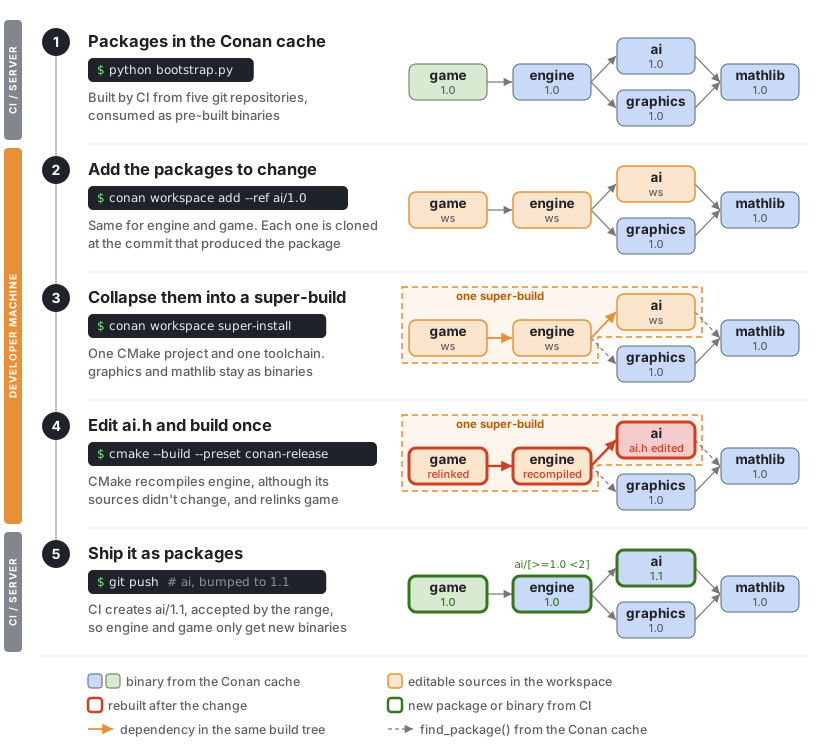
The monolithic mode is where the paradigm changes, and it’s what the rest of this post is about. This is the flow we are going to follow:
Creating the packages
Everything in this post is reproducible. You need Conan 2.31 or newer, CMake 3.25 or newer, git and a C++ compiler. We start from the conanci_workspace repository:
$ git clone https://github.com/conan-io/conanci_workspace.git game-dev
$ cd game-dev
$ python bootstrap.py
...
Packages created: mathlib/1.0, ai/1.0, graphics/1.0, engine/1.0, game/1.0
In a real organization, the packages would already be in your server, built by CI. bootstrap.py plays that role. It clones each component repository into a temporary folder and runs conan create on them in dependency order. Any extra arguments are forwarded to conan create, for example python bootstrap.py -s build_type=Debug.
Adding packages to a workspace
Packages know where their sources are, so a workspace can be built from package references instead of repository URLs. I want to work on ai and check the result in game. engine sits between them and has to be part of the workspace too, because its binary in the Conan cache was compiled against the old ai:
$ conan workspace add --ref ai/1.0
Cloning git repo
Checkout: 8595303a211ba4556f257017e789e45a515adf50
Reference 'ai/1.0' added to workspace

$ conan workspace add --ref engine/1.0
Cloning git repo
Checkout: 98aee101ef132b2f7a63fbe99686991955da8817
Reference 'engine/1.0' added to workspace

$ conan workspace add --ref game/1.0
Cloning git repo
Checkout: 88df8ca649eda1e2f30fa599fdcefc8f7bea4e4c
Reference 'game/1.0' added to workspace
Conan could clone each repository at the exact commit that produced the package, not some branch head that may have moved on, because the packages capture their git origin url and commit when they are created.
After these commands, the workspace folder looks like this. Each package folder is still its own git repository:
game-dev/
├── conanws.yml       # now lists ai, engine and game
├── conanws.py        # super-build definition, see below
├── CMakeLists.txt    # super-project, see below
├── bootstrap.py
├── ai/               # clone of conanci_ai at 8595303
├── engine/           # clone of conanci_engine at 98aee10
└── game/             # clone of conanci_game at 88df8ca
Note: Adding
engineby hand is not strictly necessary. After addingaiandgame,conan workspace completefinds the packages in the Conan cache that depend on workspace packages and adds them too, cloning them at their recorded commit. If one is missing,conan workspace super-installfails and suggests running it.
The super-build definition
Besides conanws.yml, the workspace repository contains two files that define the super-build. The first is conanws.py, which defines a minimal ConanFile with the CMakeDeps and CMakeToolchain generators for the super-project, and a Workspace class. The interesting part of the latter is build_order():
class MyWorkspace(Workspace):
    def build_order(self, order):
        pkgs = []
        for level in order:
            for pkg in level:
                pkgs.append(f'{pkg["ref"].name}:{pkg["folder"]}')
        content = "set(CONAN_WS_BUILD_ORDER {})".format(" ".join(pkgs))
        save(self, "build/conanws_build_order.cmake", content)
build_order() receives the topologically sorted list of workspace packages. Translating it into something the build system understands is up to the workspace. Here we write a small CMake conanws_build_order.cmake file, and the second file, the super-project CMakeLists.txt at the workspace root, consumes it:
cmake_minimum_required(VERSION 3.25)
project(superbuild CXX)
include(FetchContent)

# Generated by "conan workspace super-install", see conanws.py build_order()
include(build/conanws_build_order.cmake)

foreach(pair ${CONAN_WS_BUILD_ORDER})
    string(REPLACE ":" ";" parts "${pair}")
    list(GET parts 0 pkg)
    list(GET parts 1 folder)
    FetchContent_Declare(${pkg}
        SOURCE_DIR ${CMAKE_CURRENT_LIST_DIR}/${folder}
        SYSTEM OVERRIDE_FIND_PACKAGE)
    FetchContent_MakeAvailable(${pkg})
    get_target_property(type ${pkg} TYPE)
    if(NOT type STREQUAL "EXECUTABLE")
        # Just because the original packages didn't properly do it
        # but can be fixed here
        add_library(${pkg}::${pkg} ALIAS ${pkg})
    endif()
endforeach()
The key is OVERRIDE_FIND_PACKAGE. When engine/CMakeLists.txt calls find_package(ai CONFIG REQUIRED), CMake doesn’t look for an installed ai-config.cmake. It resolves to the ai subproject in the same build. The ALIAS provides the namespaced ai::ai target that the package’s find_package() would have defined. None of the packages’ own CMakeLists.txt files needed any change. Their build scripts are identical whether they build standalone, as a package in the cache, or inside the super-build.
Neither of these two files is specific to this workspace. They work for any set of CMake-based packages, so they can live in a shared repository, like this one, or be generated by your own conan new template.
Installing and building the super-build
Now we install the workspace:
$ conan workspace super-install
...
Requirements
    ai/1.0 - Editable
    engine/1.0 - Editable
    game/1.0 - Editable
    graphics/1.0#77561e5ec993160f3103f3300ea01102 - Cache
    mathlib/1.0#03ead0629a968a8daa7c5ed84418a895 - Cache

======== Collapsing workspace packages ========

-------- Collapsed graph --------
Graph root
    conanws.py base project Conanfile: /home/user/game-dev
Requirements
    graphics/1.0#77561e5ec993160f3103f3300ea01102 - Cache
    mathlib/1.0#03ead0629a968a8daa7c5ed84418a895 - Cache
This is what monolithic means in practice. ai, engine and game are now a single project, and graphics and mathlib, the parts of the graph that are not in the workspace, remain pre-built binaries in the Conan cache. I get the monorepo experience for 3 packages without building the other 2, or the other 300 in a real organization.
The build_order() method of our conanws.py has written the build order of the workspace packages to a CMake file, which the super-project CMakeLists.txt includes:
$ cat build/conanws_build_order.cmake
set(CONAN_WS_BUILD_ORDER ai:ai engine:engine game:game)
Now we can build the whole super-project and run the application as usual:
$ cmake --preset conan-release          # conan-default on Windows
$ cmake --build --preset conan-release
[ 28%] Built target ai
[ 57%] Built target engine
[100%] Built target game

$ ./build/Release/_deps/game-build/game
# PATH is different in Win:  build\_deps\game-build\Release\game.exe
mathlib/1.0: mathlib maths (Release)!
ai/ws: Some Artificial Intelligence for aliens (Release)!
ai/ws: Intelligence level=0
graphics/1.0: Checking if things collide (Release)!
engine/ws: Computing some game things (Release)!
game/ws:fun game (Release)!
The output tells the two worlds apart: mathlib/1.0 and graphics/1.0 are binaries from the cache, while ai, engine and game were compiled from the workspace sources, which the example marks by printing ws instead of a version. On Windows and other multi-config generators, the executable is at build/_deps/game-build/Release/game.exe.
Making the change
Now the actual work. ai gets a new feature, a configurable number of aliens, as a new parameter with a default value. Existing callers don’t need any change, so this is an API-compatible, minor change:
--- a/include/ai.h
+++ b/include/ai.h
-AI_EXPORT void ai(int intelligence=0);
+AI_EXPORT void ai(int intelligence=0, int aliens=3);

--- a/src/ai.cpp
+++ b/src/ai.cpp
-void ai(int intelligence){
+void ai(int intelligence, int aliens){
     ...
-    std::cout << ... << ": Intelligence level=" << intelligence << "\n";
+    std::cout << ... << ": Intelligence level=" << intelligence << ", aliens=" << aliens << "\n";
One build command, from the workspace root:
$ cmake --build --preset conan-release
[ 14%] Building CXX object _deps/ai-build/CMakeFiles/ai.dir/src/ai.cpp.o
[ 28%] Linking CXX static library libai.a
[ 42%] Building CXX object _deps/engine-build/CMakeFiles/engine.dir/src/engine.cpp.o
[ 57%] Linking CXX static library libengine.a
[ 71%] Linking CXX executable game

$ ./build/Release/_deps/game-build/game
# PATH is different in Win:  build\_deps\game-build\Release\game.exe
...
ai/ws: Intelligence level=0, aliens=3
...
Look at the third line of the build: engine.cpp was recompiled, although nobody touched it, and git status in the engine repository is clean. It’s recompiled because it includes ai.h, and the build system tracks that dependency across what are, in reality, different repositories. This is exactly the monorepo experience: the build system decides what has to be rebuilt, not the developer.
That recompilation is also necessary for correctness. engine was compiled against the old ai.h, so as the header changed it has to be rebuilt, even if the change is API-compatible.
In an IDE, you open the workspace root and get a single project. “Go to definition” on ai() in engine.cpp jumps into ai’s source rather than into a header in the Conan cache, and the debugger steps across all three components.
What to keep in mind for monolithic super-builds
A monolithic build is one build, and that has implications:
- One toolchain for everything. When using monolithic super-builds, all workspace packages share a single
conan_toolchain.cmakeand a single set of dependency files. What packages do in their owngenerate()doesn’t apply automatically. The same goes for options likeshared: the super-buildConanFilemust define its own options or aggregate the packages’ ones explicitly. - Subprojects need to be well-behaved. The
FetchContentapproach works best when each package’sCMakeLists.txtis at the root of its repository and defines the same targets itsfind_package()would provide. TheALIAStrick covers the most common gap. - One node per dependency. A dependency can’t appear twice, for example once as a
tool_requiresin the build context and once in the host context. Since Conan 2.33, Conan resolves this kind of ambiguity in favor of the host context and visible requirements, and prints a warning when it does. - CMake is the paved road, not the only one.
conan new workspacegenerates a CMake super-project, but nothing in the model is CMake-specific. An MSBuild solution aggregating.vcxprojsubprojects follows the same principle. Longer term, consuming dependencies from a source or build tree through the Common Package Specification (CPS) would make this kind of integration possible without build-system-specific glue. If you’re interested in other build systems or IDEs, please let us know.
There is more to workspaces than the super-build
The super-build exists only on the developer’s machine. To ship the change, we go back to components: bump ai to 1.1, commit and push, and let CI build the new binaries. engine and game keep their versions, because ai/[>=1.0 <2] already accepts ai/1.1, but they will get new binaries built against it. The workspace gave the developer the same answer locally, before pushing anything. The CI side of the story is covered in the Conan CI tutorial.
The super-build is the most visible part of workspaces, but not the only one. The conan workspace command family covers the whole development flow:
conan workspace add,openandcompletepopulate the workspace, from folders, from package references or from the packages already listed inconanws.yml.conan workspace super-installcomputes the monolithic super-build.conan workspace installandbuildwork in the orchestrated mode, building each package separately in the right order, can orchestrate builds when packages have different build systems.conan workspace createbuilds proper packages from the workspace sources in the Conan cache, in dependency order, which is how a change goes back to being packages.conan workspace infoandremoveinspect and edit the workspace.
Workspaces can also be shared and dynamic:
- Because a workspace is defined by files, a team can commit a
conanws.ymllisting the packages they usually work on, and a bareconan workspace openwill clone every package that is missing, each at its recorded commit. - The list of packages doesn’t have to be static.
conanws.pycan compute it, for example from the subfolders of the workspace, so cloning or removing a repository is all it takes to change what is in the super-build. - For large workspaces,
conan workspace super-install --pkg=engine --pkg=gameinstalls just those packages and their dependencies. conan new workspacegenerates a complete template, ready to start from.
The workspace reference and the conan workspace command reference have the details.
The same flow, at scale
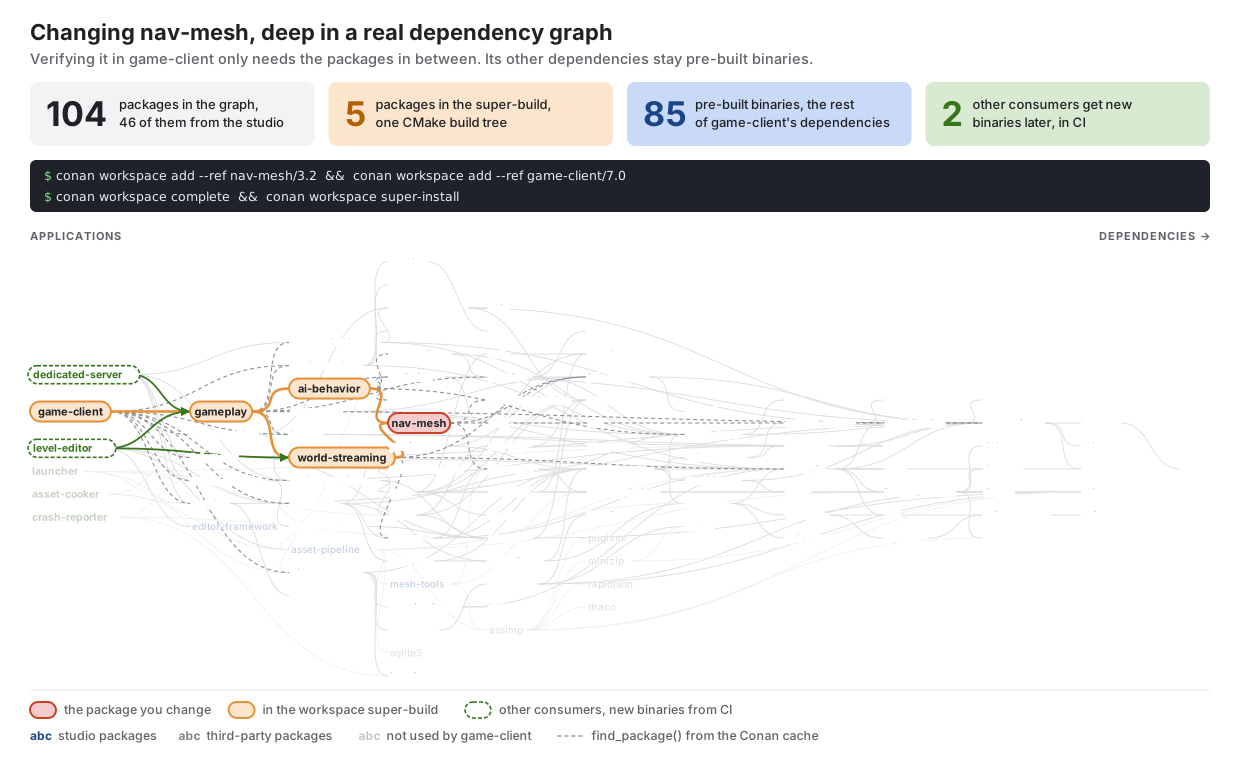
Our example has five packages, but real organizations have hundreds. Imagine a game studio that needs to verify a change in nav-mesh, deep in its graph, in game-client. Adding both to the workspace and running conan workspace complete brings in only the packages in between, and everything else stays a pre-built binary:
Conclusion
Workspaces don’t make you pick between components and a monorepo. The components keep doing what they’re good at: versioning, decoupled releases, binaries, efficient CI, etc. When a change needs to be developed and verified across component boundaries, you collapse just the packages involved into one super-build with a workspace for development convenience.
The full example is in conanci_workspace. The workspace tutorial and the conan workspace command reference cover everything here in more detail. The feature is still experimental, which means your feedback can still change it, so please open issues in github.com/conan-io/conan.