
Robotics with Conan: consuming ROS as a regular package


We know that many of you use Conan for C++ development in robotics, and that some of
you have probably considered adding ROS support to those projects at some point.
That is usually where Conan and ROS stop fitting together. Your control, perception or planning
code is written in C++ and managed with Conan, while ROS is a layer
on top of it that has to be dealt with separately, installed system-wide with apt, rosdep,
brew or choco on every developer machine and every CI agent.
If you have not worked with it, ROS (Robot Operating System) is a framework for building robotics applications: a large set of C++ and Python libraries and tools, together with the conventions that let components written by different teams work with each other. Your components run as processes that exchange data through a publish/subscribe layer built on top of DDS, using standard message types for sensor data, geometry and coordinate transforms. That universality is where its power comes from: once your code speaks those interfaces, it can be combined with the drivers, algorithms, robot models and tools that the rest of the ecosystem already publishes, or with those of the partners you work with.
For some months now we have been experimenting with conan-io/ros-conan,
a set of recipes that build the Kilted ROS distribution
from source and expose it as a regular Conan package for Linux, macOS and Windows. The idea we wanted to explore is whether
adding ROS support to a C++ project already using Conan could be one more requires, instead of a separate
installation with its own workflow. A conan install puts the ROS installation in your cache, and from
there you require and consume it like any other package. It is the other direction from the
colcon integration we described in 2024,
where Conan packages are consumed transparently inside a ROS workspace: here ROS itself
enters the usual C++ and Conan flow.
We would like to emphasize that this is an experiment rather than a finished feature. The recipes are not finished, there are no prebuilt binaries for them and they are not even included in Conan Center. This is exploratory work to propose a new approach to developing robotic applications with ROS.
ros-kilted, opencv and tensorflow-lite
resolved in a single dependency graph
What consuming it looks like
By exploring the folder of the example shown above:
cd ros-conan/examples/pose_estimation
tree
.
├── assets
│   ├── dancing.mp4
│   ├── dancing.png
│   ├── lite-model_movenet_singlepose_lightning_tflite_float16_4.tflite
│   └── output.gif
├── ci_test_example.py
├── CMakeLists.txt
├── conanfile.txt
├── readme.md
└── src
    └── pose-estimation.cpp
You can check that ROS shows up as one more requires:
conanfile.txt
[requires]
ros-kilted/2026.06.17
tensorflow-lite/2.15.0
opencv/4.12.0

[generators]
CMakeToolchain
CMakeDeps

[layout]
cmake_layout
On the CMake side, ROS packages are located with their usual
find_package() calls. The recipe puts the ROS installation on
CMAKE_PREFIX_PATH, so the config files that ROS itself installs are the
ones being used:
CMakeLists.txt
find_package(rclcpp REQUIRED)
find_package(geometry_msgs REQUIRED)
find_package(visualization_msgs REQUIRED)
find_package(tensorflowlite REQUIRED)
find_package(OpenCV REQUIRED)

add_executable(pose-estimation src/pose-estimation.cpp)
target_link_libraries(pose-estimation PRIVATE rclcpp::rclcpp
                                              ${geometry_msgs_TARGETS}
                                              ${visualization_msgs_TARGETS}
                                              tensorflow::tensorflowlite
                                              opencv::opencv)
ros-kilted is more than the C++ client library. The recipe packages the distribution, so besides
rclcpp you get the standard message packages such as geometry_msgs or sensor_msgs and,
depending on the variant you pick, coordinate transforms with tf2 or the visualization tools.
The variant recipe option ranges from core (default) to desktop and decides how much of ROS gets built.
The recipes are not in Conan Center, so ros-kilted is resolved by cloning the repository next
to your project and adding it as a
local-recipes-index remote. That
clone is also where the profiles/ros profile comes from. The two commands for that are in the
README:
git clone https://github.com/conan-io/ros-conan.git
conan remote add ros-conan ./ros-conan --type=local-recipes-index
Then the usual install and build sequence of any Conan project:
conan install --profile=ros-conan/profiles/ros --build=missing
cmake --preset conan-release
cmake --build --preset conan-release
Note: on Windows, building ROS produces deep directory trees that exceed the default 260-character path limit. Enable long paths before running
conan install.
One good thing about this approach is that there is no need to bring all the usual ROS tooling and workspace conventions into your C++ project. The application stays a plain CMake project that happens to require ROS. For a codebase where ROS is one layer of a larger C++ product, we think that is a reasonable place to be, but we would like to hear whether it holds up in a real project.
What this brings
These are the advantages we see in the approach, and the reason we consider this work worth sharing:
- One dependency graph. ROS is resolved together with the rest of your requirements, so Conan can detect version conflicts between the robotics libraries and everything else.
- No system-wide install. ROS lives in the Conan cache, so different versions can coexist on the same machine and each project activates the one it needs.
- The same tooling as the rest of your dependencies. Profiles, options, lockfiles, remotes and CI pipelines apply to ROS as they do to any other package, with the same commands on the three platforms.
- Composable with Conan Center. Robotics applications often need opencv, eigen or tensorflow-lite among others, and those come from the same graph, with no glue in between.
The ROS tools still work as usual
If you are already familiar with ROS, the ros-kilted recipe brings a couple of conveniences:
the whole installation arrives with a single conan install, and the ros2 commands can be run
without sourcing anything by hand. Everything else behaves as the
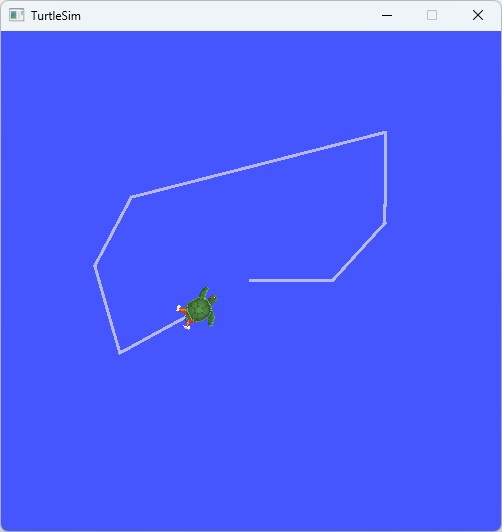
official tutorials describe. Here is turtlesim,
the small simulator used to introduce ROS, launched straight from the installation Conan provides.
It is part of the desktop variant, so that is the one to select.
Using a conanfile.txt, you can declare the desktop variant:
[requires]
ros-kilted/2026.06.17

[options]
ros-kilted/*:variant=desktop
And then execute ros2 directly from the conan run:
conan run "ros2 run turtlesim turtlesim_node" --profile=ros-conan/profiles/ros --build=missing
We would like to know what you think
Now that we have introduced this way of installing ROS with Conan, we would like to know if this approach makes sense to you. We encourage you to try the examples in the conan-io/ros-conan repository (if you have not already) and tell us what you think by opening an issue on GitHub. Any feedback is greatly appreciated!
We will also be at ROSCon Global 2026 in Toronto. If you are attending, we would be happy to talk about this in person.
Hope to see you there!